
Jehzlau Concepts Evolution
This post is all about the evolution of my blog. I will write about the chronicles of Jehzlau Concepts by showing you what this blog looked like way way back before it had an ugly header. While I was browsing my old pictures here in my laptop, I found out that my logo before was worse compared to my present logo. More about the history of Jehzlau Concepts after the jump!
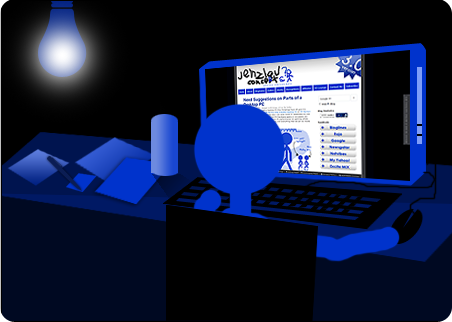
The chronicles of Jehzlau Concepts (Click the image for a larger preview).
This is my first header way back 2006. I really love this because it was unique (to my eyes before), even if it looks terrible (to my eyes now).

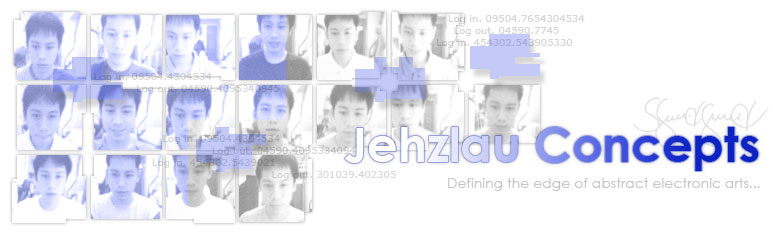
After a year, it was changed to this narcissistic header. These images were taken from the employee attendance system of the company where I was working before. Everyday when you log in and out, a picture of you will be saved in the database for verification purposes (Kung ikaw ba talaga yung nag login, so walang lusot! Hehe.).
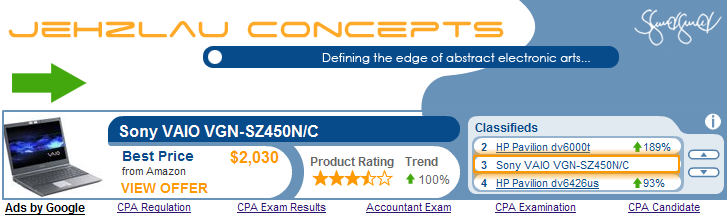
During the Widgetbucks boom, I then changed my header to match the Widgetbucks ad. This ad network had higher CTR and eCPM compared to Adsense before, and I was one of the first WB earners! Yay!
By the end of 2007, a brilliant idea appeared in my mind. Why not create an ugly header to make it look more unique. That’s why I came up with this!
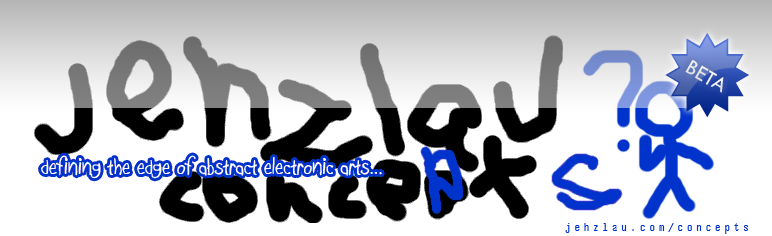
After receiving tons of comments that my header sucks and was tagged as the ugliest blog header in the entire Milky Way galaxy, including Andromeda, Triangulum and all galaxies inside the Local Group of galaxies, (and also inside the Hickson Compact group of galaxies and M81 group of galaxies) I came up with this cool header!

So that’s it! I now have a new header and my layout was tweaked a bit. I will now show you what are the new features here in my blog. Here’s a snap shot of the new layout, viewed in 1280×800 widescreen resolution.
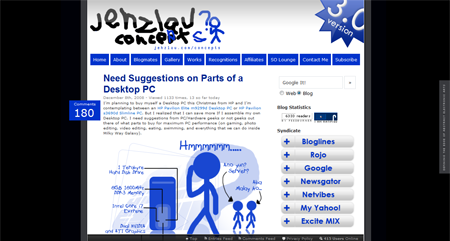
This layout is proudly NOT W3C compliant and has 41 Errors found as XHTML 1.0 Transitional. In short, it has an invalid XHTML Markup! But I don’t really care as of now. (Because I’m too damn lazy to fix the errors *sigh*). As long as it looks good in Firefox, Chrome, Opera, IE and Safari, I’m fine with it.
Another cool new feature in this blog is the Quick Menu. A fixed menu at the bottom of my blog.
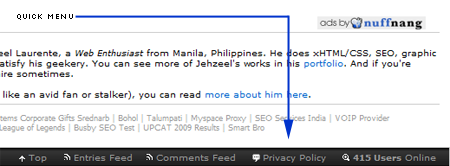
In this Quick Menu bar, you will find my Entries RSS, Comments RSS, Current Online Visitors, Privacy Policy, and a nifty button to get back to the top of the page.
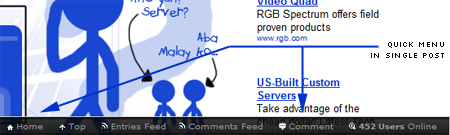
And also, a magical and super oh-so-awesome feature of this quick menu is that it changes its options when you are viewing a single blog post! As you can see, a home page button now appears in the quick menu together with the comment button. Once you click the comment button, you will then see the comment box in a blink of an eye! Now that’s fast and extremely amazing!
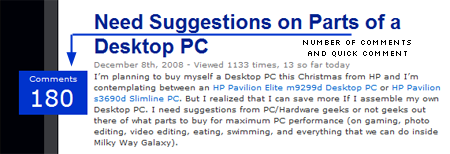
Another great addition to this blog’s layout is the comments show-off box that is floating on the left of each and every post on the main page. Once you click it, you will be redirected to the blog post of where the comments were.
The final and most amazing feature of this tweaked layout is the blog’s description position. It is uniquely placed on the right side of the blog layout. Even if you scroll up or down, it doesn’t go with your scrolling. It remains there, fixed and as it is! I’m serious, try it yourself!
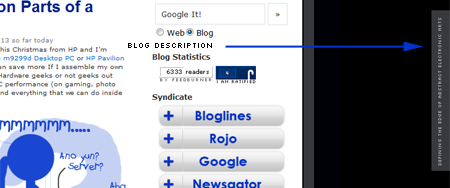
Whew! That’s all for the awesome new features of Jehzlau Concepts. Thanks for you time reading! If you love this blog post and you’re craving for more, why not subscribe to my RSS feeds via e-mail? This is a one-time limited offer! I tell you, this service is 100% free. No fees, no credit card numbers, just free stuff from this oh so cool blog! Subscribe now before it’s too late!
And oh, before I forget, my favicon is now changed from the old blue favicon with semi-white J to this modern-like black favicon with J and C placed on uneven black shapes. Yey!
First comment! Hehehe
Bagong design/layout? Nice! Syempre blue parin ang color scheme. Ok lang kasi blue din ang favorite color ko eh. Its good to see the evolution of Jehzlau-Concepts.
I like the fixed menu at the bottom of the page. Great job Jehz! More power to you and your blog! 😀
astig..haha..3.0 na..at talagang nka wide LCD Screen pa..

wahehehe.. oo nga pinag hirapan ko yan.. isang buwan kong ginawa yan 😯
ahaha.. 😯
waaaaaaaaaaaaaa! 😮
whoa ur the first commenter! WOOOOOOOOOOT!!!! 😮
Salamat sa pag like ng fixed menu! yiheeeeeeeeee! cool no? Ang dami nang pinagdaan ng blog ko, from that oh so ugly header to this oh so not-so-ugly header. hehehe
kaya pla nanibago ako sa blog mo…
cute naman ung first header mo ah.. pero mas like ko itong bago.. nyok
nyok
hehehehe 😀 talamat..
cute ba yung luma? yung year 2006 na header!?!?!? 😯
😈 Whooo!! Ganda ng new theme mu!! Paki gawan din yun aken 😀
hahahaha.. sure pag gaganahan.. hahahaha.. 😆
Baka revolution?
evolution talaga yan.. kasi nag evolve..
Cool blog layout. Magiging suki na ako sa blog mo and I’ll subscribe to your RSS feeds na rin. maganda, pati na rin yung fixed div na nasa kanan. Unique idea. Kudos to Jehzlau! I’m ur instant fan!
thanks Jasper!! hehehehe.. talamat talamat talamat!
waaah! di ako ang first commenter.. huhuhuh.. ang bibilis nila 😮
galing kuya, mas gusto ko ang layout na to. modern na modern. ang papangit pala ng header mo dati (peace )
)
pero pangit talaga.. hahaha. Ngayon oh so cool na!
hahaha oo ang papangit talaga! nyok nyok nyok!!
astig 😀 hehehe!!!….
talamat gab! wahehehehe saya saya!
ganda ng floating comment show-off box mo, ayos sana ilagay sa blog ko kaso wala din silbe, hahaha. galeng 😀 nyok
lagay mo din sa blog mo.. view mo lang CSS. makukuha mo na agad yan.. coooool yan! yiheeeeeeee!
Nice design 😛 Sorry di kita natulungan. Inantok na kasi ako nun. hehe
ok lang koya.. buti naka chamba at napa lutang ko sa kaliwang bahagi ng tahanang pahina ang dibisyong iyon.
I haven’t been a fan since the beginning of Jehzlau Incorporated (hehe)… but I did start reading since your “narcissistic header” phase. I actually still remember that header! LOL.
hahahaha! salamat sa pagdaaan sa blog ko dati fruity oaty! yay! oo nga na aalala ko parin ang narci header ko 😮
yan yung time na nanalo ka sa top ten emerging influential blogs of 2007 at napadaan din ako sa blog mo..
ah.. the good old days…
wow, jehz ang dami na palang pinag-daanan ng blog mo. 😮
oo nga.. dumaan na to ng bagyo, lindol, baha, kidlat, at marami pang iba! 😮
ugly header rocks!!!
yeah it rocks.. it’s oh so cool! hahahah! 😆
From beta to version 3.0. Ganda ng progression. Love the navigation at the bottom of the page, overall mas neater ang look. Pero ang selling point pa rin ay iyong content. I suspect may secret formula dyan hidden somewhere. Yan I think ang main show… kahit miss ko na iyong wacky story like when you lost your precious sim dun sa naglaglag ng barya sa kalye. 😀
waaaaaaaaaaaah!!!! 😯
ur browsing my archives! waah wah wah!! nabasa mo pala yung katangahan kong nabiktima ako ng hulog piso gang.. 🙁
hehehe… oo nga eh. beta tapos naging 3.0, ang layo no? 😀 apat 1.0 muna.. pero mas cool tingnan ang 3 eh.. kaya 3 nalang
Ibig ko lang pong sabihin malayo na narating ng blog mo in terms of design regardless of version number. 😀 Ganun din sa nilalaman. Pasensya na, kelan ko lang nadiscover may blog pala. It’s a good thing you’re one of my first reads in the blogosphere. E di siguro naglalaro pa rin me ng online games ngayon. And please don’t discount the value of that story, it’s one of the reasons nagsubscribed ako. Nagawa mong very highly entertaining ang isang pangyayaring nakakainis. Rare gift yun ano.
hahahaha! oo nga no.. nung binasa ko ulit yung hulog piso gang, natatawa ako sa aking nasulat.. naiinis ako at the same time parang sarcastic yung pag ka thank you. hehe, pero thank you talaga sa hulog piso gang kasi di nila kinuha cell phone ko 😀 we should thank always..
parang yung sinulat ko na smart bro sucks, sinasabi ko astig na astig ang smart bro kasi pa wala wala ang connection, awesome masyado.. hahaha! 😆
eto yung gustong gusto kong line sa smart bro post ko:
“Well, I’m not complaining, because I love smart, I don’t have a high-speed broadband connection, only a putol putol connection, and I love it because it keeps me awake, and wait for Smart Bro to reconnect again. If it’s disconnected, I’ll just click diagnose, and windows will detect what’s the error, if windows cannot detect the error, I’ll click diagnose again, until my Smart Bro will come back to life for minutes, and again, it will eventually be disconnected, so what I do is execute that “diagnose” routine again, then I’ll go back online, then offline, then online again. Was that amazing??? hehehe…”
😆
whew! Ganda ng mga headers…tsaka features! …. 😀
salamat drei! yiheeeee! teka yung diploma ko pasko na! hehehe 😮
wow! i like this sort of a new template… 😆 but still i dont like the header! hahaha 😯 it still sucks! hahhaha 😈
u must admit reality.. it sucks but it rocks! hahahaha!
Mas ok sa mata ko yang new looks ng blog mo. Mas maarte, I mas artistic…lol! Ang art daw, pangit sa mata ng di nakakaintindi.
Uniqueness is an art. Di totoo na pag nanggagaya ka, ay mas kikita ka. Tingnan mo ang channel *, gaya ng gaya sa channel ** kaya di nananalo ng awards e….
Keep it up!
hahaha.. channel 1 at channel 11 yan no!?!?! 😀
wahehehe.. oo maganda pag unique, walang katulad.. kaya na isipan kong papangitin yung header ko.. hand writing ko yan gamit ang right hand ko kahit left hand me, buti nalang na spell ko parin ang jehzlau concepts
Galing mo talaga! Sana may alam lang din ako sa programming. Wala akong alam e. In fact, I paid a web developer to develop my blog when I transferred to a paid hosting with a wordpress theme. ➡
Pero mura lang naman 🙂
waaaaaaaa! dapat kinontak mo nalang me.. I’m glad to help for free
haha! i realized narcissistic header na yung inabutan ko nung nakilala ko blog na ‘to then. wow..tagal na din pala. but as usual, my blog sucks while yours continue to gain readership. sipag kasi mag gagagawa ng kwento eh. hahaha! cge, cge… abangan ang susunod na kabanata ng jehzlau concepts. 😯
hahahaha.. mga kwentong walang kwenta no? nyok.. wahahaha.. kwento ka din ng kahit ano
yay! andyan ka pala! heehee..
ayos ah, naabutan ko blog mo jezz year 2007 na 🙂
anong header na abutin mo? yung narci no?
Naabutan ko pa ung 2nd generation na header design.
wahehehe talagang lumang luma na talaga yung first generation, wala atang umabot. .ako lang ang reader ng blog ko that time, si winston din ata na abutan yung first header
Kahit ganyan itsura nyan, I find it really unique! Haha! =P
yay! salamat sa pag appreciate ng munti kong design cealagar
Angas ah. Astig. Better than before. 🙂
hahahaha! salamat Hussein!
Parang scientific dissertation ito ah, hehehe
hahahaha! binasa mo ba lahat? walang kwenta mga sinulat ko.. ang OA
infurrnez, gusto ko yung comment markers mo ha. di nga lang pwede sa kin kse laging 0 lang yun, mapapahiya lang me! hahaha!
ang haytek naman po talaga ng layout mo, pang-genius lang at nanghihigop ng mga tanga sa html /xhtml/xml/sml/med/lrg na katulad ko. hahaha
yow emz! oo nga cute, pinag hirapan ko yan! tagal ko nakuha na ipalutang yan dyan eh.. hahahaha 😀
wahehehe… anong MED at LRG? medium at large? woooooot! di ko gets, nose bleed ako sayo 😯
oo dinugtong ko lang yun, nag-fit naman sa list di ba? bwehehehe
hahahahaha kala ko meron talagang MED at LRG 😮
galing ko naman kung meron nga. hehehe
magaling ka naman eh kahit wala hala.. exciting, baka panalo ka na ng VAIO! yiheeeeeee! 😯
naku, di na ko umaasa dun! bibili na lang ako ng sarili kong laughtaff na mura. hahaha
habang may buhay mag pag asa 😀 jhehehe.. grabe scroll down ko para makita new comment sa post na to.. nyok 😀
dapat mag post na ako ng year end post ko.. waheheh 😀
oo nga, isang buwan na tong huli mo! 😀
mag iisang buwan pa lang.. hindi pa isang buwan.. hahaha… hirap mag isip ng bagong post. waaaaaaaaaaaa! 😮
ayos, mas malinis at organized.
😀
hahaha! talamat aethen
Nice, tapos na beta phase. 😯
For me, the best ung first header mo.
hahahaha! ang pangit kaya nun~ ! 😯
😯
➡
Aliw talaga ako dun sa time in time out pics nyok
galing mo talaga, waldner 😛
hahahaha.. time in time out waaaaaaaaaaaa! 😯
kuya astig ang pagka gawa mo ng drawing! galing galing!
hahahaha! oo astig! talamat jen! 😯
naabutan ko sayo yung ugly header na.. di kasi ako nag vivist ng blog mo dati, ngayon suki mo na ako jehz!
dami mo na palang nagamit na header. ang sagwa nung widgetbucks, mukhang pera ang dating ng blog mo.. buti naisipan mong palitan agad yun! haha
charlyn!! long time no seeeeeeee! ako naabutan ko pa yung first header.. wala pang header naabutan ko na eh, una pa ata ako nagka blog kay kuya tapos gumawa na din sya, ginawan nya ako ng header dati sa bunnyjenny.co.nr kaso wala na yun ngayon di ko na na update.. hayyyy.. 😥
matagal tagal na in yung ugly header kaya matagal na din yung naabutan mo. .thanks charlyn
uy jehz! ang cute cute ng bago mong header! modern + stylish + web 3.0. hehehe.. pero mukhang mas astig na talaga ngayon, lalo na tong quick menu mo sa baba at sa kanan na description div na fixed
natawa ako sa linyang to:
“The final and most amazing feature of this tweaked layout is the blog’s description position. It is uniquely placed on the right side of the blog layout. Even if you scroll up or down, it doesn’t go with your scrolling. It remains there, fixed and as it is! I’m serious, try it yourself!”
hahahaha! kala mo kung anong ipapa try.. syempre naman naka fix yun eh.. nyok? nyok!!!! haha!
pati eto:
“Whew! That’s all for the awesome new features of Jehzlau Concepts. Thanks for you time reading! If you love this blog post and you’re craving for more, why not subscribe to my RSS feeds via e-mail? This is a one-time limited offer! I tell you, this service is 100% free. No fees, no credit card numbers, just free stuff from this oh so cool blog! Subscribe now before it’s too late!”
hahaha! sana forever free ang subscription mo jehz, naku pag may bayad na siguradong ang mahal!!!
hahahaha.. oo nga ate zainey! sinabi mo pa! ang mahal cguro nag subscription dito pag may bayad.. di na ako magsusubscribe pag meron.. 😯
hahahaha! kaw lang ata nagbasa ng post ko at napansin mo yan 😮 hehehe talamat zainey!
nice doodle on the header.
thank yah chester 😀
Danda nung first image, Jehzlau at work. Kaso bakit bumbilya lang, hehehe.
mahirap lang kasi si jehzlau kaya naka bumbilya lang 😀 sana nga ginawa kong kandila no? wahehehe..
tinamad na kasi ako mag drawing, tapos may shape na na bumbilya kaya yun nalang
paadd sa blogroll
Humble-Pride
http://humble-pride.blogspot.com/
thankssssss
nasaan yun mga smiley?wala ko mkita
and2 mga smilies oh.. baka di lang nag load sayo 😯
di pa pala kita na add? woooooot! cge add kita
ok na check mo na link na kita! 😯
ayun..hehe
mali pla..
eto pla tama..hehe..
Edzhstar
http://edzton.blogspot.com/
akin di kaya yun Tarlaqueños Blog..hehe..na nauna mo ng inADD
aw palitan ko link? nyok 😯
waaahh..mali un url na nilagay mo.. 😥
aw napalitan ko na ba? or mali parin? hehehe.. sensya na tagal na akong d naka online! nyok 😮
nagkanindot na imong blog. try ko kaya WP…
uu mag WP ka na! masayang masaYA!
Ok pala evolution ng blog mo. I thought the present blog design was your first.
hahaha.. di no. dami na pinag daanan ang munting blog na to.. salamat sa pag daan Lito
hanep sa evolution! heheheh.. magaling magaling magaling!
salamat Rashid!
nice flashback jehzlau! from the looks of it, gumanda naman ng gumanda itong webby mo! 🙂
maraming maraming maraming salamat snow
nyok! nagevolve nga ang galing talaga, gusto ko yung comments show-off box dun sa baba 😀
thank you karen dayle
huwhoah!! grabe astig!!! Concepts has been through a lot!!! more power! may the force be with you!!! \m/
thank you Jedi Master
Wow sosyal ha. Mukang sobrang bihasa ka talaga sa coding. Nice 🙂 Keep it up!
Hi Gel! yay! thank sa pag daan sa blog ko! di ako bihasa sa coding.. pa tsamba tsamba lang
amazing! the black looks amazingly black. (o color blind lang ako) 😳
i like the colors.
heehee.. salamat ish!! yiheeeeeeeeee! tama black at blue at white.. hindi ka color blind! 😯
wow bago na ah!!! may prob nga lang sa 800×600 screen resolution. try moh! hehe.
ok lang.. la me paki sa 800×600.. nyok la nga me paki may 41 errors sa XHTML transitional validation, wala din yung fixed menu sa lahat ng IE, kasi dinisable ko 😯
ang tipid mo nman sa ilaw isang light bulb lang gamit mo pag nacocomputer ang ang laki ng lcd screen ah, tsaka medyo makalat table mo hahahaha, well your blog more than meets the eye! hahaha keep it up!
hahahhaha! oo nga tig hirap kasi… at makalat yung table kasi tamad mag ligpit.. nyok…
kawawa talaga ako naka light bulb lang.. kahit sa totoong buhay.. light bulb lang.. na mahina ang ilaw.. kahit naka on na.. madilim parin.. 😥
naabutan ko yung puro muka mo ang header… la naman masama dun… hehe
narci yun eh 😯 hehehe…
Nakakalula. Na-miss ko dito. Ivd been so self-abs0rbd lately. C0ngrats!
hehehe.. thanks for missing my blog ayel yay!
yay!
Merry Christmas Jehz.. nice new blog features ah!
salamat pakjwan! 😯
OK tong mga headers mo ah.
Merry Christmas!
merry xmas paul u 😀 talamat
just wishing you one very happy holidays jehz! merry christmas and one bombastic new year!
happy new year reynzzz!!!
Hi Jehzeel,
Here’s greeting you the very best of the Christmas season. May the Lord shower you and your family with countless blessings this coming year. Thanks for joining Filipinos Unite!!! God bless you and your loved ones always.
Mel Alarilla of Filipinos Unite!!!
yay! thanks mel 😀
wow laki ng niimprove. hhmmm… why not try another layout? 🙂
oh, merry christmas nga pala 🙂
aw.. ok na ako dito sa layout na to.. 😆 happy new year! yiheeeeeeee!
talaga? any other color except blue? hehehe…
marami namang color blog ko ah.. blue lang ba? nyok.. color blind na ata me 😮
Wow nice one Jehz! Galing mo talagang bata ka e igawa mo nga din ako hahaha. Merry Christmas to you and your family Brother!
hahaha.. merry xmas din! nyok.. di nga ako marunong kaya nga ugly header lang kaya ko
Dumaraan lang at bumabati ng Maligayang Pasko
maligayang pasko din dex! yay!
Happy New Year naman ngayon jehz.. he he
wahehehe.. oo nga happy new year ulit! nyok
It’s a cute evolution! Congratulations and Happy Holidays Jehzlau!
talamat digiputz! yay!!! 😯
kuya mali un nsa blogroll..
http://edzton.blogspot.com/ po dapat
awwww… sowi sowi.. nyok
Galing! Merry Christmas pre!
mas magaling ka! idol na kita! na pakyaw mo ang Yahoo, MSN at Google, at top 1 and 2 pa sa Google. WAAAAAAAAAAAAaaaaaaaaaaaaaa! super sipag at super galing! yay! congrats again 🙂
Just dropping by to greet you a blessed holiday season and God bless! 😀
same here 🙂 thanks for dropping by jaypee 🙂
Jezheel, kamusta na bunso? Hoping for your continuous success and stay on TOP of your career… Happy Holidays!!! 😀
thanks Sir Arnel! hehehe 😀
cool, marami na din pala naging looks ang site mo. Napansin ko nga agad na bago ang looks ng site mo. It’s nice, very simple pero catchy sa paningin. Merry Christmas!!!!! 🙂
yey! salamat limferdi! yiheeeeeeee!
galing
talamat pot pot 😀
first header, the best.. the latest, cool!
salamat richard! pangit kaya yung first header! hhehe
yays! nyokzz! ang ganda na ng lay out.. cool na cool nyokz.. heehe…
salamat webslave 😯
sa pag-evolve ng blog mo, jehz, malamang, ito na ang homepage ng bawat browser sa buong mundo. hehe… 😀
wahehehe.. sna nga! nyok
oi jehz.. panu i.integrate ung facebook status at twitter sa plurk? andun ka pala sa homepage ng plurk.
aw.. di ko alam.. paanong nangyaring nasa homepage ako ng plurk? nyok..
cool site.. will surely read more posts..
yolynne
thanks Yolynne
hala!!!!!!!!!!!
bakit nawala ka sa 1st page ng free psp games..
matagal na yung wala.. nyok.. sa .com.ph lng meron, at walang free, “psp games” lang.. nyok
your posts are interesting. Nakita lang kita sa frontpage ng nuffnang. Nice topics you have here. Ahmm ask ko lang kung pwede makipag link exchange sau 🙂 I’ll wait your answer on my tagboard =D
Love Drops nalang gawin kong anchor text mo ha.. just leave a comment here if gusto mo papalitan
weeeeee nice mas lalong gumanda blog mo ah ngayon nalang ako ulit nakadaan dito weeeeee HAPPY NEW YEAR! 😉
nice meeting you also daniel! yay! happy new year!
Hhahaha… I like the story… mekabuluhan naman pala eh. Nung first time ko dito una ko napansin ung ala-chatroom mo na comments. At sino nagsabi ugly yung header?! Sabihin mo sakin!
si kuya drew po.. at marami pang iba.. wahahah! 😆
aahhhh ok! hmm… happy new year! =X nyok! Tama ba pronunciation ko?
uu tama.. nyok
Jehz, Happy New Year
happy new year din dexter!
happy new year jehz! ahmm ano ba yung anchor text? BTW, na link na kita 😀 check mo nalang dun sa friends section ko, sa baba ng plugboard.
yung anchor text yung text na e lilink.. like sa akin pwede jehzlau, or jehzlau concepts or jehzeel laurente, hehe
Happy New Year Jehz! Tagal walang bagong post ha.
wala pa.. abangan mag kakaroon ako within this week, ang hirap kasi gumawa ng post.. haha!
Happy New Year, Jehz! And congrats on your blog’s redesign. It looks a lot better now. 😎
hahaha.. naks talamat po
Happy New Year po, ninong.
happy new year din jan! yiheeeeeeeee!
Happy new year. All the best in year 2009!
likewise Salwa!
Jehz! I did a redesign of my website too! http://www.ampota.com/ 😎 happy new year dude!
whoa! ok ah.. mas naging astig.. modern na modern ,pero maganda din yung luma mong design, waaaaa! pero maganda din tong bago. hehe
Hi Jehzlau just stumble upon your site and I get your url from nuffnang I got curious so I came a cross here and browsing your site and I find your topics really interesting so I bookmark you on my pc wakokokoo!! btw your story is really inspiring hope that your career continue 😀 anyway the way you tweak your blog is really cool I like it because it is very friendly in any browser. LOL the header yeah right! it is better to be that way because it really attracts reader it is really unique in my opinion because I have never seen anyone uses a header like that except you 😛 anyway hope for a link exchange with you so I could easily follow your updates via my blog. 🙂
salamat ayei!! dumaan na din ako sa blog mo at nilink na rin kita ^__^ thanks sa pag appreciate ng munti kong header 😥
nyahahahahaha asteg nga po eh
yey~! nalink na kita kua jehzlau wakokoko 😆
Yup ako po may-ari dati K-F.com kaso may bumili n domain me nung irerenew n me 😥 nakilala me sea agad XD thanks sa popuri.us kung di dahil sa kanila d ko makilala cnu sea XD
yay~! kea pala sabi ko familiar ka sa akin d ko lng maalala, then nakita ko ung luma mo header sabi ko “I think I knew him talaga” ahahaha 😀 ty ty ty paps for the linkie linkie 😀 check u n lng po ung link page me 😉
hahahaha! salamat sa link ayei 😀 yay! good thing ur back 😀 sayang yung K-F.com, kung na renew mo lang earlier.. ganun talaga pag na late ka or lumampas sa deadline, di mo na makukuha ang domain unless na e drop ng bumili ng domain. Di naman ginamit nung bumili, pinark lang, so baka e drop yan someday. Abangan mo nalang 🙂
Happy New year ayei
wakokoko uu nga eh pero masaya n rin me sa bago me domain pero namis ko rin k-f.com :(..yeah I am hopping i drop n rin sana yun kasi willing ako kunin din
anyway HAPPY NEW YEAR din po, bisita me here if you have new topic I really love your post because almost of your post are really helpful 😉
bantayin mo lang palagi para pag drop, sayo na ulit! hehehehe…
salamat for loving my post.. konti lang kayong nag mamahal.. hehe 😉
happy new year ulit ayei
I still think that the theme is not that as important as the content. Content is still the king. I would rather visit a blog (that has an ugly layout) with interesting articles than read a blog (that has a nice theme) with useless and stupid posts.
I hate validating my code, because it could take much of my time before I can find the line/s that make/s it invalid. It’s annoying but nevertheless, I make sure that my code is valid.
ur right christian 😀 thanks for visiting my blog. yay! i love validating my code, pero for my clients. sa akin, masyadong maraming error (kasalanan din ng widgets at iba pang nilagay ko sa blog T_T ) kaya wala na me ganang mag validate.. hehe
panalo ang mga headers.. kahit saang anggulo.. maganda padin.. hehehe.. 🙂 HAPPY NEW YEAR!!
ows? wahehehe.. salamat jeniffer
hi,
thanks for comment in my site, pwde rin bang makalink sau for this challenge,
busby seo test pinay – hxxp://pinayspeak.com/pinaytest/
thanks,
rich
sure thing rich! na alala mo pa ba ako? nyok.. ako yung tinawagan mo dati nung nasa alaminos ako 😯
Yo Jehz!
but but.. the blue favicon is more cute..
anyhoo, we have a film to shoot so buzz us! 😀
namimiss ka na raw namin (?) nyok!
oo nga. pero dapat maiba naman.. wahehehe… 😀 nyok nyok.. miss you all too! wala pa me new year post.. abangan…
Help mo ako gwa ng template ^_^ 😮
sure thing 😀 hehehehe
Jehz enge nga ako ng emoticons mong blue? Pano ba yan? ganda eh hehehe
right click mo lang isa isa, tapos save image as.. hehehe 😀 then upload mo isa isa ulit 😀 or upload mo via FTP 😉 or install ka ng download them all plugin 🙂
ay talagang isa isa? matry nga! Akala ko plugin chorva! Hahahaha. Thanks kapatid!
yep yun ginawa ko, tapos may inedit pa my sa functions.php na file, pero may plugin na to para madali, di ko lang alam ano yung tawag sa plugin. parang custom smilies plugin, tapos ikaw nalang mag lagay ng image. Pag gusto mo tong blue na images ko, save as mo isa isa 😀 hehe
hayz… Life… Kumusta ka naman? Happy New Year!!! 😀
oks lang naman.. kaw kamusta ka na? happy new yeaR! 😯
happy new year!!!
happy new year too nunu 😀 yay!
kuya, paano po maglagay ng follow scroll ng navigational link?? tulad po nung nasa baba? hehehe. thanks po!
yung black ba na semi transparent? sa CSS lang yan.. naka fix.. 🙂
view mo CSS source code ko at copyahin mo lahat ng nasa #fixme ID
patulong po kuya ha..how po?
copyahin mo lang CSS na #fixme ID 😉
kuya, thanks po. try ko ngaun. san po bang part ng template dapat ilagay yun?
nga pla po, ask ko lang. may kamag-anak ba kau sa apalit, pampanga? thanks po!
Pingback: The Late Year-End Post and The Chronicles of The Blue Stickman
Winner ka talaga kuya Jehz!
Naabutan ko pa yung first and second layouts mo 😀 Haha. Di ko na matandaan yung third 😀 Hehe. 😛
yay! thanks sa pag abot 😀 nyok… grabe nakita mo pa pala yung luma ko..waah!
Yea. Matagal na kasi ako blogger. Around second year high school nung natuto ako nito. 😀
At I’m sure na at a point na-meet ko na ang blog mo. Puro ka-mushy an ung akin eh. HAHA.
Pero my other blogs before eh yung Da Kopi Palace at Emo Bui. Hehe.
congratulations!
it’s best web site design whiç I ever saw till now
More power to you, kabayan!
Sir! Galing naman po ng evolution ng blog nio!
Kahit na pang sobrang vein nung pangalawang header :), sobrang astig pa din ng feature na nadagdag.
Sana po matuto ako nian 🙂
hahahha! napadaan ka pala dito! 😀 puro mukha ko yung pangalawang header no. haha
Interesting read… Was your change of header to this “artistic” one also the beginning of your blog’s popularity? Or was it already receiving a lot of traffic even before that? What’s your most successful blogs?
Changing my header is also one of the factors. hehe.