
How to Purchase Ayala Malls Cinema Tickets via Paypal?
UPDATE 03/03/12: They removed the Paypal option a year ago, so we can’t purchase SureSeats.com credits anymore via Paypal. Too bad for Paypal users. Damn!
This post is for those who were curious of how to purchase Ayala malls cinema tickets via Paypal. This is just a short and nifty tutorial of how to reserve online and purchase tickets in Greenbelt, Trinoma, Glorietta, and other Ayala Malls and pay for it with your Paypal funds.
First, visit www.sureseats.com and register. Once you are registered, you can purchase M-PASS credits via Globe G-Cash or Credit Card. If you want to pay via Paypal, select the Credit Card option in purchasing your M-Pass Load. You will then be redirected to MyAyala.com wherein you will continue your M-PASS load purchase. Just click check out, and fill in the form with your mailing address and complete name. Afterwards, select “Pay via Paypal”.
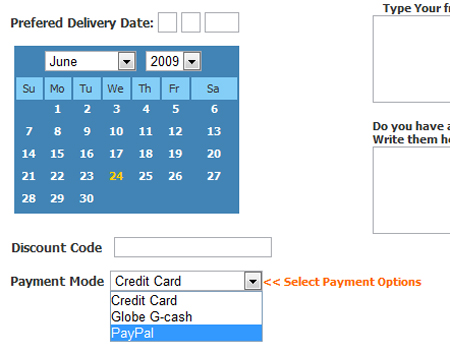
You will now be redirected to your Paypal account. Login to your Paypal account and complete the purchase. Once you’re logged in, and you’ve completed the purchase, you need to wait for the e-mail from MyAyala.com containing your M-PASS Code.
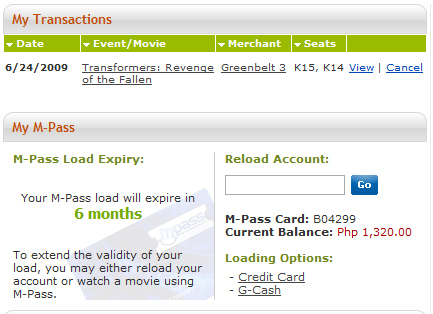
Your M-PASS code is a 16 digit alphanumeric code in this format: XXX-XXXXX-XXXXXXXX. It will be highlighted in RED. The e-mail subject from MyAyala is: SureSeats Your[myAyala] Order#(Then a 12 digit numeric code).
Copy the code and paste it under the reload account text input. Preview below:
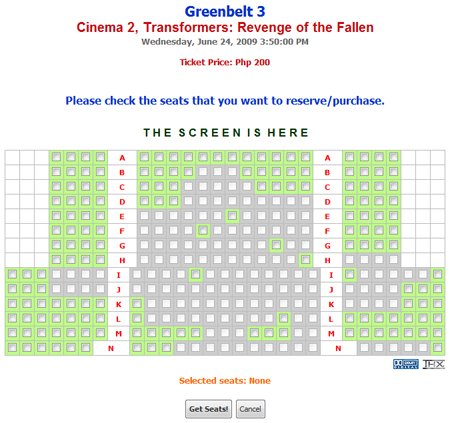
Select your preferred seat then you’re good to go! (The screenshot below shows the current seats available in green. The gray ones are no longer available)
Once you’re done, you can print your ticket! It’s just like an Airline Company’s e-Ticket. (You can only print your ticket if you already linked your M-Pass card to your account. If you don’t have an M-Pass card yet, all you can do online is reserve seats and claim it on any M-Pass counter inside Ayala Malls an hour before the movie starts)
About the M-Pass Card: Once you are registered, you can claim your M-Pass Card in any M-Pass Cinema lounge from any Ayala Mall near you. Just tell them that you would like to claim your M-Pass card and you already purchased an M-Pass load online. They will then link the card to your account. You can use this card if you haven’t reserved online yet. Just go to any cinema booth, select your showing schedule, then present your card. They will just deduct a certain amount from your card depending on how much is the present price of the ticket you want to purchase. (No other fees, just the present price of the ticket on that day)
That’s it! If you have questions, clarifications or suggestions, please don’t hesitate to leave a comment.
Hi there! Probably did any one be aware of this filmmaker Joseph Fusco? He created a nice short film named chloe a – z, sadly my friend and i consider the guy is probably not enormously noted. I and my friend have check out mr. fusco now resides around new york. I want to be able to identify just what other good movie films this filmproducer has produced, could well any one from this blog offer me some helpful infos relevant to him?
Muy buen artículo. Adios!
Great info thanks
i didn’t know i could do this. thanks! speaking of entertainment, I was able to watch a live streaming the Pacquiao Vs Margarito at http://www.buyregalo.com absolutely free. hopefully they have more of these events streamed on their website for free. great online shopping website btw. 🙂
Hayyy.. I missed this feature. 🙁
Pingback: Why Ayala Malls Cinemas Suck after September 13, 2011? | Bryan Veloso
I need to save my money to buy my presale ticket for Warped Tour 😀 #SUMMERTIME