
Western Digital Passport: My Very First Portable Hard Drive
This was my very first portable HDD. It costs 9,500 Pesos in Power Mac Center, Greenbelt 3. I decided to look for a cheaper one because Power Mac’s price was too expensive for me. I found this 320GB Portable HDD on eBay.ph for only 6,800 Pesos! This elegant portable HDD was very simple to use, light and easy to carry, and requires no power adapter — it was powered directly through the USB cable. It works with MAC and PC.
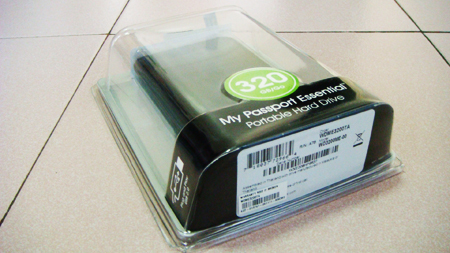
This very sexy portable HDD comes with a USB Cable, a Manual, and a yellow paper with some information about Western Digital products.
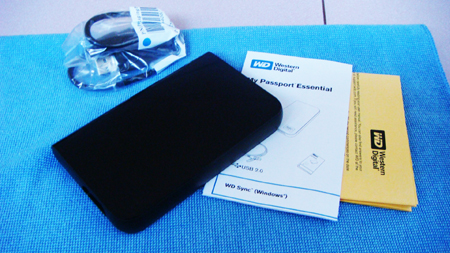
Some Key features of this Portable HDD.
USB powered – Powered directly from the USB port on your PC. No separate power supply is needed*.
Synchronized and secure – Plug My Passport into any PC, edit files, read e-mail, and view photos. Then sync all of your changes back to your home or office computer. Your data is protected with 128-bit encryption. (Windows only)
Includes Google™ software – Search your drive, manage your photos, and simplify Web searches with included Google software. (Windows only)
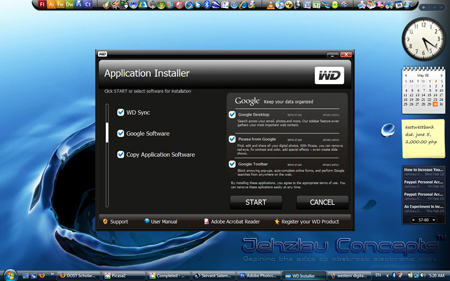
You can also opt to install the Western Digital Passport software with WD Sync and Google Software if you want to. Here’s a screenshot of the Application Installer.
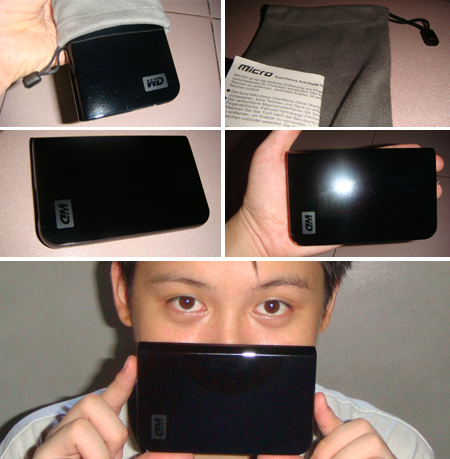
I also bought an anti-scratch Portable HDD pouch at Games N Gadgets. In case you’re buying a portable HDD and you didn’t have a case or a pouch for your gadget, I highly recommend this cool, not-so-expensive, anti-scratch pouch by Micro. It protects your shiny gadgets from dirt, scratches, finger prints and other unwanted dirty marks. It costs 299.00 Pesos in all Games N Gadgets outlets.
If you’re planning to buy a cheap Western Digital Passport HDD. Be it a 320GB, 250GB, or 160GB storage, I recommend Xquisite Technologies, Inc.. They have all the latest and cheapest gadgets in town. From Portable HDDs, Flash Drives, Laptops, LCD Monitors, and many more. You can view all of their eBay items here. They’re the only one who sells Western Digital Passport HDDs and FreeAgent Go HDDs in eBay Philippines as of this month or maybe next month or maybe next next month. Their store is located at 1-C Broadway Park, 1st Street New Manila, Quezon City. Their store is open from 10AM to 6PM, and 12NN to 6PM on Sundays.
By the way if you want to buy it in “COD method” you can get to their shop easily by following my simple instructions. Take LRT2. If you’re from Santolan Station, turn right, walk along Aurora Blvd.. After reaching Broadway Ave., turn left, walk for about 133 steps (binilang pa no?), then turn left again after you’ve reached 1st street. Their store has no sign yet, so you can’t locate them in a snap if you’re there for the first time. The store was located after the first green gate along 1st street from Broadway Ave. (on the left side if you’re from Broadway Ave, and on the right side if you’re from the opposite end). If you’re from Recto Station, turn left then follow my instructions above. Check their map in case you get lost.
That’s all for now. 🙂
Wow. Nakita ko rin item na ito sa eBay. Gusto ko sana bilhin kaso … … … wala na akong pera. 🙁
@Mikko – oo nga may utang ka pa sa akin.. hehehehe 😀
I might check that out. I have a stupid macbook and I can’t use my PC’s externals with this piece of junk.
big time! mukhang kakailanganin ko na din nito. hehehe
bro, ayus ung directions mo haha..
kelan din kaya ako magkakaroon niyan?
@Mi – yeah.. WDP HDD is a great choice if you’re looking for a reliable portable hard drive 🙂
wow!!! kakainggit, hehehe. kelan kaya aq mgkakaroon nyan, 🙂
@rara – haha.. oo naligaw ako dyan nung pumunta ako.. para di na kayo maligaw.. may number of steps na 🙂 hehe.. kung sakaling bibili kayo 🙂
@Ed – yeah kelangan mo talaga nyan.. pag marami kang pictures at MP3s at mapupuno na yung PC mo.. hehehe.. may 1TB din nyan pero malaki 🙂
nice one Jehz
oh thanks for the info/feedback. im also having trouble w my mac, since my roommate has a pc and a pc type hardrive we have been sharing. ill look for a cheap on too.
@Cesar Noel – bibili ka din? hehehe
@philippines economy – ur welcome 😀 it was really a great portable hard drive 🙂 i have tested it on a MAC and it really works 🙂
Thank God for this post! I’m also looking for a portable hard drive that works on both mac and pc… 🙂
Matagal tagal na din ako naghahanap ng hard drive na maiit at pwede kong ilagay sa bulsa.. buti nakita ko tong post mo! mabuhay ka!!! bibili na ako nito!!!
I’ve already updated my blogroll. Now, its your turn. 😀
@Sarah – welcome sarah.. Western Digital Passport Essential is really a good choice for a portable HDD 🙂
@Beejing – thanks 😀 hehehe.. ur also in my blogroll na 🙂
@Paulito – kaya bili ka na din ng HDD mo.. Western Digital Passport the best 😀 hehehe
weeeeeeeeeee! ako im on the process of creating enclosure..para rin syang portable hard drive..weeeeeeeeee
Yaman na talaga. 😀
@bugITs – enclosure??? ano yun? hehehe
@Hussein – nyok.. di ako mayaman.. jobless na nga me eh.. hehehe 😀 🙁 huhuhuhu pala dapat not hehehe..
Huhuhuhu.. 🙁
wow!!!bonggang2 jehz…ana pa akong kaworkmate astig daw!!whew…pakitaa sa ko ana bago ko magpalit ug ako, ug mkapalit pud lage..hehehehe..
@chang – wahehehehe 😛 nyokkkkk astig diay na? 😀
Pingback: Anonymous
Pingback: Anonymous
Pingback: xoomly.com
Pingback: The Late Year-End Post and The Chronicles of The Blue Stickman
Pingback: Free Hardcore Six Videos and Six Photos Online!
[..] A bit unrelated, but I rather liked this blog post [..]
[..] A little unrelated, but I absolutely liked this webpage post [..]
hi! i’m searching on this product and saw your review. It’s been quite some time now since you got your passport HDD. How is it? Any comments after the long use? I’m concerned about how long before it will slow/crash. I’m planning to get my first portable HDD and I’m concerned about putting all my files on this. I hope you can let me know. Thanks!
I’ve been using this 320GB WD HD for more than 2 years already and it’s really trusty. 🙂 I’ve never experienced file corruption or data loss with my WD passport. I even bough 4pcs 1TB WD Passport this year. ^__^
I now have a total of 12 Terabytes of sweet digital storage at home, all from Western Digital. 🙂
Thanks for the update. I’m glad to hear that you’ve had good reviews on this product. I initially saw this in Greenhills and was thinking about it.
Could you give me an idea about the price range of where you got it? (I tried the link you provided in your post but the ebay and the other link seem to be no longer valid.)
1TB? Wow! That must be heaven! Can I ask, do you just use your portable as storage? I also plan to use it to store videos/movies/music and attached to a laptop with only a 4GB HD. So most likely if I buy this portable, it will be a working HDD for me. I’m concerned about my constant use of it. The reason why I’m paranoid is because previously I bought a hard drive then when I went out of the country, I bought an external case for it and converted it to a sort of portable HD, within a year that HD broke down. *sigh*
I really do appreciate all your help! 🙂
Yep. All the links in this post were dead a longggg time ago. I haven’t updated this post and I don’t have plans to update this anymore because the portable hd I reviewed is already obsolete. Hehe.
The price range of WD 320GB Hard Drives now are between 3k to 5k. I suggest you get a 1 TB HD from Western Digital.
I have posted a short review and unboxing photos of it in my tech blog (that’s not always updated unlike other tech blogs out there, hehe): http://www.gizmosync.com/unboxing-wd-my-passport-essential-the-wallet-size-1tb-portable-hd/37236.html
Price range of Western Digital 1TB Pocket HD is between 8k to 11k here in the Philippines. It depends of where you want to buy it.
To get the cheapest reliable WD passports, I suggest you shop at eBay.ph.
double post. 🙁 sorry
couldn’t reply after your last comment in the thread (couldn’t find the reply button) 😥
thanks for all your help and your review. I’ll check out your latest review for the 1TB. 🙂
I’m excited to get a Passport HD.
😡 👿 😀 💡 😳 😛 😉 😮
I’ve had my Chocolate Touch since it came out. I employed to have a Razr. I’ve been seeking around at the filesystem on Bitpim and just started putting flash wallpapers on it. I’ve also checked to see how EnV Touch themes look on it. I’d like to commence attempting to make themes and wallpapers in Adobe Flash CS4. But I just commenced, so it’ll possibly be awhile just before I get anything. Tongue
Pingback: ??????? ???? | ?????? ????!