
How to Increase Your Blog Traffic Even If You Don’t Update Frequently
If you’ve noticed my traffic upsurge, you’ll probably ask where the hell did this guy get his blog traffic, even if his blog contents are gibberish, articles are not well written (misspelled words… wrong grammar… you know), and he doesn’t even update his blog as often as other bloggers did.
Well, the answer is simply Google Trends + A little SEO.
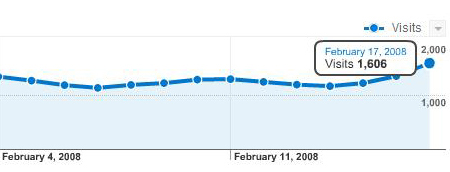
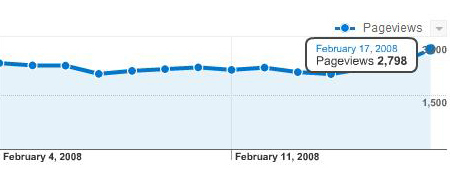
For just one week, my unique visitors increased from 1000, to 1600, and my page views increased from 1500 to 2700. Now, that’s quite an achievement for a newbie blogger like me. Yay! 🙂 Here are some “Google Analytics” graphs to prove my traffic upsurge. Heehee…
Daily Unique Visitors:
Daily Page Views:
I admit, my blog traffic is not that high compared to other bloggers. I’m just happy because somehow I have readers and visitors that continues to visit and read my blog day after day even if it’s kinda boring. Hehehe. Thanks to eveyone who dropped by, and gave me some traffic. 🙂
So, how can you gain traffic from Google Trends + SEO? Here are the few easy steps to have some “International Traffic” roaming in your blog, even if you don’t update it frequently.
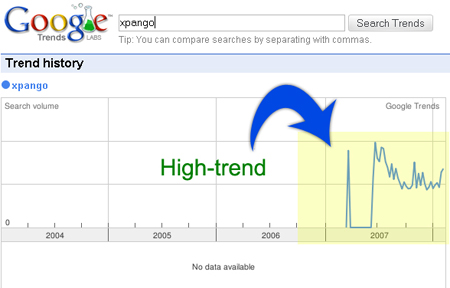
1. Look for a high-trend but low-dense keyword. A keyword with a graph in Google Trends is an example of a high-trend keyword. A keyword that return few results is an example of a low-dense keyword. For instance, “XPANGO”. According to Google Trends, many are searching for this keyword. “Curious” people are looking for comments and testimonials regarding Xpango, if it’s genuine or not. If you’ll check the results, there are only 395,000 pages that contain the keyword Xpango. That makes it a high-trend, low-dense keyword. Btw, my post regarding Xpango ranked first in all Google data centers, excluding the official Xpango website. Use this tool http://mcdar.net/dance to check the latest results in all Google data centers.
A Low-dense Keyword

A High-trend Keyword
2. Optimize your keyword. Make sure that your post title is the keyword that you’re trying to optimize. Don’t use “A testimonial regarding Xpango”, or “My Xpango Experience”, instead use only the single word that you’re trying to optimize: “Xpango”. In that way, your post will rank higher in SERPs. If you’re curious why did I rank high even if my post title was “Is Xpango a Scam?”, the answer is simple: proper link building. To optimize a keyword, you need to create at least 10 or less back links using the anchor text that you’re trying to optimize, creating more than 10 back links will be considered as spam by Big G.(as per my experience), so don’t attempt to create such. You can create more back links after 24 hours to increase your chances in ranking higher on SERPs.
3. Proper Link Building. If you’re trying to optimize the keyword “Xpango”. Create a link (from other blogs or from social bookmarking sites) that points to your blog using that anchor text. DON’T create a link using your POST TITLE as your anchor text, IF your post title, and the keyword that you’re trying to optimize are completely different. For instance, my post title is “Is Xpango A Scam?”. I have created backlinks with the anchor text “Xpango”, that points to my blog post. Notice that I haven’t created a link that contains my post title, instead the keyword that I’m trying to optimize. In that way, the Google crawlers will read my post title as “Xpango”, not “Is Xpango A Scam”.
4. Wait for the Results. After doing the first 3 steps. Wait for the results. The only not-so-hard-part is looking for a high-trend but low-dense keyword. ^_^
Bitin dude.
TSK BITIN NGA
your readers will be pissed off with you if you write this way. You shouldn’t titled your post “How to Increase Your Blog Traffic Even If You Don’t Update Frequently” if there’s no tips on how to do it. I felt being tricked.
@makoy – I’m still thinking of how to answer it kasi 🙂
Hay naku!
Bakit ko nga ba sinasayang ang oras ko sa pagcomment sa walang kwentang post na ito. Wala lang, pinagmayabang lang! Hehehehe.
😀
@mikko – hehehe.. update ko yan later.. balik ka lang 😀 di ako maka isip paano ko isusulat eh 😀
okei naman ung post.. hehehe… kuya ngau ku piso!! hehehe peace!!
another trick n naalala ko ulit dito sa post n to, make it intriguing. na intriga kc ako kaya ko lang pinuntahan..
gudluck!
@petixe – thanks petixe 😀
thanks alot, been waiting for this.
one more thing, thanks for the tip, found my own high-traffic, low dense keyword:
Results 1 – 10 of about 226,000 for p********t. (0.10 seconds)
(ps: tinangal ko ung keyword, baka ksi merong ibang gumamit…..)
@paul0 – wow anong keyword kaya yan??!?! interesting! hehehe.. gawa kaya me post.. list of high-traffic low-dense keywords! bwahahaha! 😀
Thanks for the tips! I’m glad you’ve updated it, some readers are annoyed because they’re very eager to know how to increase their traffic, but sadly, the post wasn’t finished yet.. haha!
Thanks again!
Very interesting naman salamat sa post… about sa dun sa #2 Optimize your keyword. less than 10 backlinks from other website ba tama po ba?
Mahusay ang pagkakabayba. Nitong ga huling araw pinag aaralan ko rin gumamit ng mga keyword tracker para kumita at gaya ng sinabi mo .. mahirap humanap talaga ng mga low dense high traffic keyword..
O yan di na bitin ok na. nice one.
yan updated na ang post mo. inform mo ako o ym mo ako pag ok na yung list ng keywords. gusto ko itry yan.
thanks!
@Neil – yep. huwag mo masyadong damihan.. like creating 100+ back links in a day.. kasi e coconsider yan ni Big G as spam, baka mawala ka sa SERPs bigla.. hehehe 😀
10 links a day lang ok na yun 🙂
@makoy – yeah.. still looking for those keywords 🙂 para may ma list ako.. hihihi..
@obed – hehehe.. ur welcome 🙂
@dexter – mahirap talaga, heehee..
@dannyubuntu – oo nga… dali dali kong inupdate baka marami pang ma bitin.. nakaka takot.. hehehe 😀
oooh nice tip. hindi ko alam na dapat magkaiba ang title ng backlinks at ng original post.
mahirap ngang maghanap ng keyword na ganun, pero para sa akin, kung nakahanap na ako, ang tanong e interesado ba akong magsulat tungkol doon?
depende 😀 nasa sayo na yun, if maghahanap ka ng creative way para magsulat tungkol doon.. or hindi 😀 hehehe
A very good post. Thanks for sharing them. I’ve been planning to do this on my blog wala lang talgang time to make posts that are irrelevant to my niche. ^_^
Thanks fro sharing!
@ PinoyBlogero – try mo lang sa archives mo.. hihihihi 😀
change the title. hahahha
@ winston – waaaaaaaaaaa! 😀 hehehe
i’d better use this to promote http://marroxas2010.blogspot.com
ha ok lang naman un post ah! bitin bah i don’t think so ^_^ ahihihi
mwahaha!
galing mo
idol.
excited nako sa post mo jehz, hehe di kaya cheat din yan using multiple email accounts? hehe
@julia – hahaha idol ka dyan! amf
@glenn – hehehehe.. anong cheat sa multiple email accounts? di ko alam yun ah 😀
@kevin ray – yeah.. u better use it 😀 hahah 😀
@aice – hehehe.. di kasi yan natapos dati.. kaya bitin 😀
WoW! what a trick. You have implemented that one and now Google is foavoring you. Nice work.
@jehz sorry akala ko nandun ako sa post mo ng Feed burner tricks, wait ko kse ung BITIN na post mo dun eh, dami ko kse nakabukas na window ng site mo hehe
@glenn – experiment pa kasi yun.. pero hindi yun multiple e-mail accounts ha.. it’s 100% useless. parang niloloko mo lang sarili mo kung mag subscribe ka sa sarili mo wahahaha! 😀
yung subscribers ko subscribers talaga.. pero may technique nga lang na pang akit ^_^ 😀
ah! ganun pala yun! 🙂 dami mo nang subscriber, 1K na pala, sa akin, nastuck na. medyo wala ako ngayon sa mood manghijack ng keyword eh.
uu marhgil. ganun nga.. wahahahaha!
Nice!
Interesting post, I wrote a response/commentary on it on my blog: http://katzwebdesign.wordpress.com
a little tip: it’s much better to put links on social networking sites such as friendster (ie: commenting), because blogs use the “nofollow” attribute on comments with links. links with the “nofollow” attribute are ignored by google.
@ Web Designer – thanks 🙂
@ katzwebdesign – thanks, and thanks for the blog post 🙂 hihihi..
@paul0 – thanks for the tip ^_^. I never knew that friendster doesn’t use nofollow tags. hehehe ^_^
Sounds like a solid bit of experimentation, and so I’m just off to GTrends to try and find myself some likely hotties. Thanks for spelling it out for us;-D
Great tips! I will try those.
Txs
hi po..what do you mean po ng “IF your post title”? Beginner lang po…Sorry =]
wow…it looks great…i will try it.
txs for your help.
uy,
help
naman
po oh,
gusto ko kase yung url ng feeds ko eh ganito
http://feeds.feedburner.com/~/~~
meaning nag iistart from feedburner.com
ayoko kase yung ganito lng:
http://julia-aquino.blogspot.com/
pa’no po ba yun?
kanina pa ko hanap ng hanap ng
sagot eh
help!
😉
@julia – hehehe.. register ka lang sa feedburner.com
may ganung feed URL ka na kaagad 🙂
@dyimz – di ko gets yung tanong u.. hehehe 😀
meron na po ako
😉
di ko lng alam
kung saan ba dun
icoconfigure eh,
alam ko kase may option
dun na ganun,
di ko lng alam kung saan
i tried every possible way
pero talaga wala
help ulit.
😉
@julia – after mo e add ang blog.. makikita mo doon yung Feed URL mo 😀 hehehe.. ^__^
thanks for dropping by my blog. i’m a super newbie so i still have tons of questions to ask from you, guys. thanks so much!
sorry po ah,
pero parang di mo po aq naiintindihan eh, 😉
diba sa feedburner po merong
html buzzboost?
ung parang mag aadd ka ng feeds mo
sa ibang blog like ung:
http://feeds.feedburner.com/JuliaAquino
feeds ko, gusto ko pong idisplay
sa iba kong blog as headlines,
pero imbes na:
http://julia-aquino.blogspot.com/
gusto ko po ung url niya is
something like this:
http://feeds.feedburner.com/~/~~
by the way, thanks for the attention, i really really appreciate it.
😉
@julia – hahaha.. iba pala pagka intindi ko.. cge w8 nga silipin ko.. hehehe
@julia – sa palagay ko di pwede palitan yung sa buzz boost! hehehe.. di ko din makita eh.. parang wala ata 😀
nice, full and complicated site
thanks to you, i rank 4th for “maroon 5 concert” and 1st for “maroon 5 concert philippines” keywords at google, kya lang nga tpos na yung concert, kainis, sayang!
how do you do that?
@paul0 – great job! hehehe.. may traffic din yun syempre 😀
Have you seen the Easy Viral Traffic blog yet? They provide some pretty cool information about how to get free website traffic… check it out http://www.easy-viral-traffic.com/blog/
Pano po if long tailed keyword ang inooptimize ko? For ex. Britney Spears scandal video How will I link it in social bookmarking sites?
@Ferdie – yung buong sentence na yan ang e link mo.. hehehe :d
Pingback: Free Music Streaming and Free Streaming
worth trying 🙂
Pingback: Calling SEO Freaks! What in Heaven is Googel?! | Blogging | Everything Eli dot Com
Pingback: PSP eboot and popsloader | BabyfacE
Very nice 🙂 btw very good tips i will use them. Some of them i did not knew.
@SCE – thanks SCE.. trends + little SEO is really effective 😀 hehe
Nice Post. Thanks 4 that.
=========
http://john-britto.blogspot.com
Wow! I Got new Idea!! Thankx sir!
this is really a nice info… i’ve read several blogs that followed your advice and they all seem receiving some pretty decent traffic… gonna try this…
Hello my friends 🙂
😉
Thanks for the great and the stats that you have put in. Looking fwd for more of it.
Rock on jez-lau
I agree that the content of the post is good even though the title is a bit misleading. Nice stats.
@tacsiyapo – nice to hear that 😀
@Did you know – welcome.. taas na imong kita no? hehehehe
@karen – thank you so much 🙂
Do you have any tips on google trends, I have heard about it, but never used it. Sounds like a great tool
oh.. it’s easy to use google trends.. just visit trends.google.com and type any keyword.. you will see a graph that indicated how the keyword was often search in Google.com 🙂
bago lang ako.. yong keyword ba yong title mismo ng post mo or yong tag..
hays sorry ha…
at yong social bookmarking, panu yon bookmark mo sarili mo? eheheh sorr talaga tol ha, di ko gets e
😀 Is there 💡 any one know how can i get pagerank for my site in google and yahoo anyone knowns how to do it ➡ Please reply if you have any good ideas
My advice for you is not to comment spam, your blog might get banned by google. if know you someone who got it.
yehey makiki XPANGO n rin ako, tnx for the tuts!!!
welcome 😀 wala na ako sa XPANGO.. sa inyo nalnag yung keyword an yan 😮
wahhh! ngayon lang me gagamit ng google tracks! wait lan pano ba.. research lan me..
atsaka ung serp? whats that? he he
Pingback: SEMIDOPPEL’S DELIGHT! » Blog Archive » TAPATAN with JEHZEEL LAURENTE ^_^
Thanks for this tip! Will try this out in my blog.
hi jehz. bisaya diay ka? ive been browsing your blog for quite some time now, looking for SEO tips since you’re so successful in marketing your blog. i wish i could have 1000 visitors a day. hehe. pwede ko ask some questions? hope you don’t mind.
1) could you suggest some sites that give good backlinks?
2) how long does it take for a blog to reap the benefits once naimplement na ni nga tip?
pwede patudlo how to optimize my blog. ive been trying a lot of stuff, pero it seems di man enough. hope to read more of your SEO tricks 🙂
bisaya mo lang! hehehehe
1.) submit ka sa social bookmarks, use socialposter.com, effective yan.
2.) awww.. depende sa keywords na pipiliiin mo
i moved some of my seo tricks in my SEO Playground, hehe.
kaya yang 1000 visitors a day.. dati pangarap ko lang yan eh.. ngayon 10k+ daily na 🙂
wow 10k a day! maayoha gud nimo. 🙂 thanks for the tips ha. may mga nakukuha akong good keywords but it doesn’t really turn up first in a search site agad. ill try the social bookmarks to get backlinks. gamit nako http://www.onlywire.com pero murag wala na man kaayo gawork. or maybe it’s because i haven’t been updating a lot? does it matter?
it doesn’t really matter. 😀 the only thing that matters is the number of high quality links that points to ur website or the URL that ur trying to optimize
okay i totally lost track of your post title. nanotice man gud nako mudecrease ako traffic if di ko mag-update. or basi di lang jud ko kamao mu-optimize og keyword. help!
kahit di ka mag update.. basta yung post mo nasa first page ng serps, araw araw ka may visitor 🙂
notice.. wala me new update may 750+ users online me as of writing this post. 🙂
choose the right keywords to optimize
Ang galing! 😛
😛
talamat tyron 😯
eto pala tips from the master, hehehe! 😛
welcome daddy mike! 😯
Tried this and it works 😀 problem ko lang e di na ako masyado nakakapost sa blog ko dahil sa sobrang busy wah! 😳
aw.. ok lang yan, post ka lang ng more high trend keywords, para kahit busy ka you will still have daily unique visitors from search engines. 🙂
very nice info here. happy to read it.
Wonderful ! very good info. keep it up.
Wow! These are very helpful tips. Thanks
Thanks for reading Char 🙂
wow good info, no wonder you got to #1
its all abt for u
I hope this will work on my own blog.
I follow your posts for a long time and must tell you that your posts always prove to be of a high value and quality for readers.
master can i ask kung papaano magsubmit ng mga post sa socialmaster.com bakit ganun try ko sya pero di nagwowork..tnx for ur advance reply..
aw.. di ako gumagamit nyan.. socialposter.com lang ginagamit ko
master, paano ginagamit ang socialposter.com? kelangan ba bumili ng program nila?
I hope I would be able to learn this SEO thingy too.. 🙂
Thanks for the great tips, Jehz. I will implement want I learn from you today. Hey, I am the 727 visitors in this lovely site the time I’m writing this.
hay! sana matuto rin ako ng seo! mahirap sya intindihin for newbie like me..
Thank you so much for the valuable post. You have a great site, I think I should subscribe. 🙂
Good! 5* Thanks!
How many link i need to make?
May nabasa ako d2… baka po makatulong…
http://www.techronnati.com/forums/index.php?board=31.0
Hey Really good tips and ideas.I am new in internet marketing and still learning about everything.I like your site because is easy to follow and very useful!!!!!!
very informative post! thanks..
Thank you for this tips boss. Will have to learn this stuff. 🙂
Pingback: Abusing Google Trends – Unethical blogging | Denver SEO Blog
my blog is brand new so i dont expect it to have many visitors but i’d like to do some of the SEO for me to gain traffic in the future..
http://www.privatesimon.com 🙂
This is actually the right post for newbie. Thanks for this!
Sir Jehz, you said once you bookmark you just need to put the keyword itself..then..how about the content?? Can you tell more please.. I am new to SEO, my blog don’t get a good traffic eventhough it was publish 7 months ago..please help sir..I always check all of your post because I learn lots of things..please help..my site is all about helping new freelancers, newbie or professional to get an online job or work at home job..